
Description
Stop losing visitors, impress your users, help them find what they need, make your site admins happier, help your site breathe more easily and don’t waste money on expensive 3rd party search, all with our Super Speedy Search plugin.
What customers say
Rated 5.0 out of 5 from 12 verified reviews. A few of them in their own words:
“It dropped a product search from 45 sec+ to 2-3 sec in combination with Scalability Pro. This is used on a website with 3000 products…”
– inkoop
“That is the best search plugin on the market and I can guarantee that – I have tried pretty much everything. I have a website with over 500k posts…”
– piltchev
“This is precisely the search plugin you need for your WooCommerce website. It performs well with our 50,000+ product catalogue.”
– Mark Francis
All 12 reviews are further down this page, and you can watch a customer’s own video walkthrough too.
What Super Speedy Search gives you back
- Keep visitors who would otherwise bounce. Slow, irrelevant search sends buyers away. Fast, relevant results keep them clicking through to your products.
- Grow your catalogue without fear. Customers run it on catalogues from a few thousand products up to sites with over 500,000 posts, so you can keep adding stock without your search grinding to a halt.
- Make your admins faster too. Order, product, media, post and user search in wp-admin all get quicker, so the people running your store stop waiting on spinning wheels.
- Cut third-party costs. No Algolia or hosted-search subscription. Everything runs on your own server, so there is no per-query bill and nothing switched off if you stop paying.
- Buy with a 60-day full money-back guarantee. If it is not for you, ask for a refund any time in the first 60 days.
Key Features
- Suggests instantly as you type, based on common phrases from your site
- Finds matching taxonomies and post types – configure how you wish!
- Ultra fast, tested against multiple 1 million product stores every release, 20ms response rate with our custom MU ajax plugin file
- Integrates with our filters plugin to filter categories, brands and attributes by your search string – let your users drill down their search!
- Fully customise your search results with weights, rules and display options
- Supports posts, products and all custom post types and post meta
- Display specific product variations in search results – if someone searches for red dresses, show the red variation images!
- Speeds up every search area in wp-admin – your site admins will love you. Order search, media search, product search, post search, user search etc.
Unrivalled Speed
We’ve worked hard to make Super Speedy Search faster than all other WordPress search plugins.
20ms Custom Ajax Handler
The default WordPress ajax handler adds a minimum of 0.5s to the response time. This is an unacceptable delay, so we built our own ajax handler which responds in 20ms so your users see suggestions as they type.
Lightweight, Fast, Scalable SQL
Most other search plugins use the slow LIKE operator. This means that as your site grows, your site slows. This is probably why you are here looking at this plugin.
Everything we build, we build for scale. We use fulltext indexes and altered search queries so that speed is always fast, no matter the size of your site, and as a bonus you get far more relevant results.
Our search query takes 0.2s against 1 million products on a $20 per month server compared to over a minute for regular WooCommerce search.
Everything Super Speedy Search does
Ajax Search Results Panel
When your users search there are 4 sections in the instant (20ms!) ajax results panel:
Search Suggestions
These search suggestions are pulled from the most common phrases used in products & posts on your websites. Our customised fast ajax code means these suggestions appear instantly – as your users type.
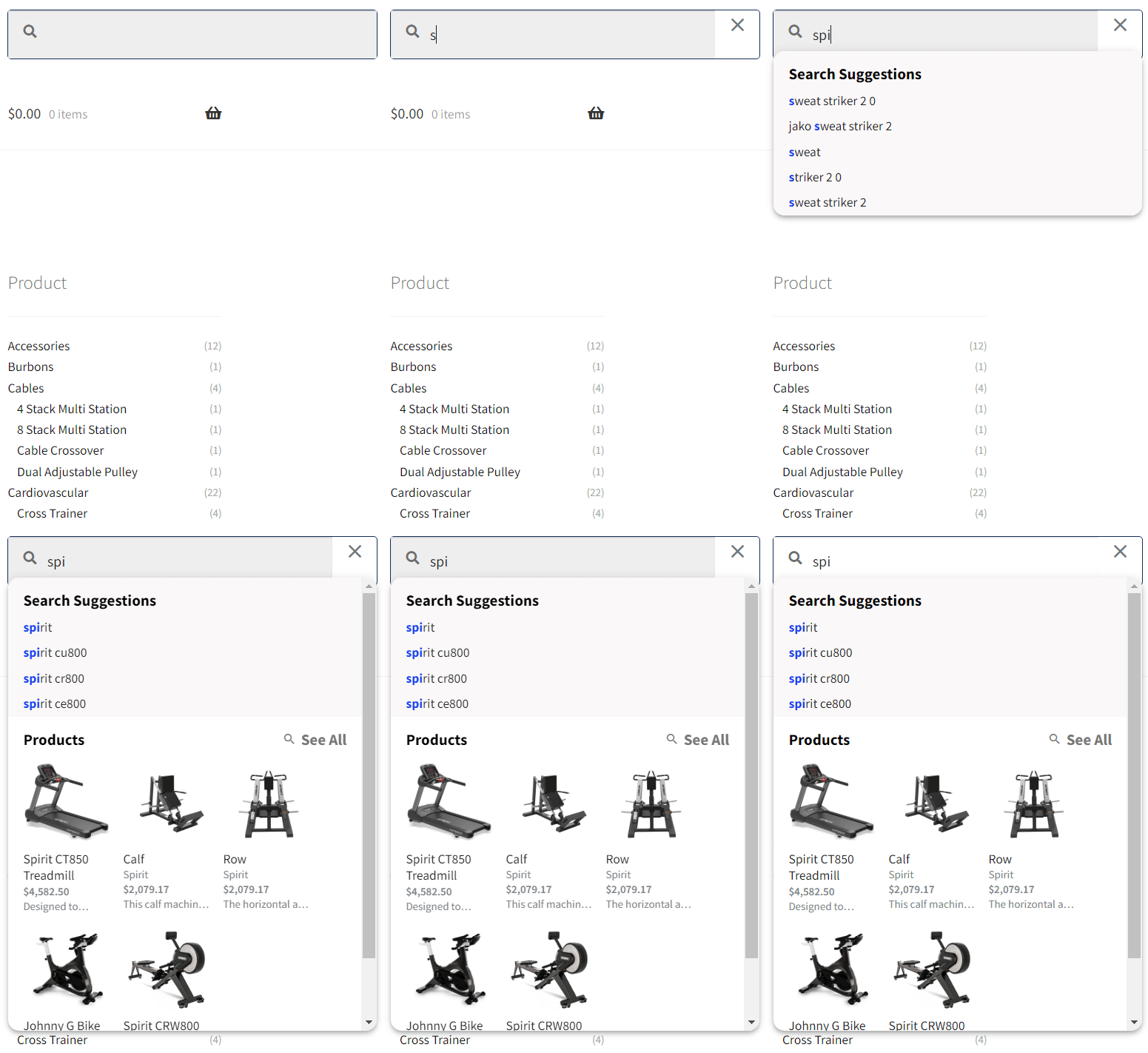
Taxonomy Suggestions
These can appear underneath the search suggestions or to the right, depending on the options you choose in our plugin.
For example, if you have an author taxonomy and someone searches for ‘Dan Brown’ then they will see the matching Author term for Dan Brown where they can click to be taken to Dan Browns page on your website.
Widget Panel
The Super Speedy Search widget panel lets your place any widgets you like into the search results panel, and have them filtered by the search query.
Products/Post Type Matches
This shows the most relevant products or posts that match your search. There is one section per configured post type. Super Speedy Search is compatible with all post types including custom post types.
Fully Configurable and Developer Friendly
Configure each post type in the ajax results to show in grid or list view, choose where your see-all button goes, how many items to show and more.
Our ajax panels use templates you can copy to your theme folder to override and completely customise how you wish!

Fast front-end search
Super Speedy Search was built to solve WordPress search once and for all in an affordable way. That means ultra-high speed at a regular cost that all site owners can afford.
On our demo $20 per month server, 1 million products are searched and sorted in 0.2s and we test every release against this reference site and others to ensure we never drop any speed.
Fast wp-admin search
Super Speedy Search intercepts searches against WP_Query and replaces the slow and unscored LIKE queries with fulltext MATCH/AGAINST queries.
This means that everything that uses WP_Query including the REST API and the vast majority of search operations are optimised by Super Speedy Search.
And for cases where WP_Query isn’t used, like with WooCommerce wp-admin product search, we have custom code implemented to speed that up too.
Weighted Search
Having a fast search plugin is not enough, you also need to ensure your customers see relevant results.
Out of the box, Super Speedy Search beats other WordPress search plugins when it comes to showing the most relevant items first.
Our use of multiple fulltext indexes allows us to tailor text-match weights accurately against your items whilst our lightweight & efficient denormalisation of wp_posts, wp_postmeta and the term tables allows us to score items properly and fully.
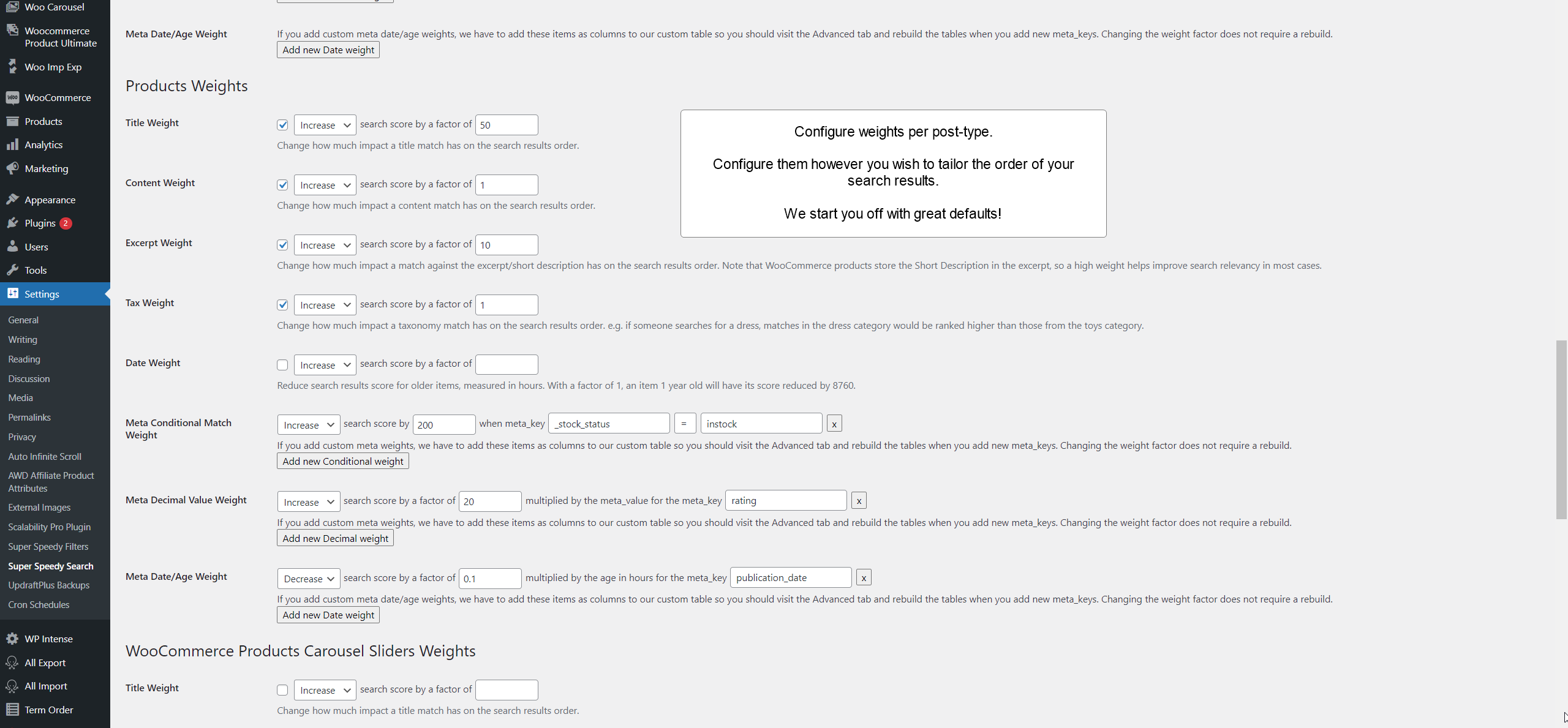
Standard Text Weights
Score results higher or lower based on text matches in titles, excerpts/short descriptions, content, term names, term descriptions and meta values. We provide tried and tested default weights to get you started.

Advanced Meta Weights
You can increase the score of search result items if their postmeta data matches certain rules – e.g. boost instock products higher in the search results, boost articles written in the past 6 months, or boost your featured items and more. Your imagination is your limit.

Meta Multiplier Weight
Boost or reduce relevance for items using multipliers based on postmeta values. This lets you improve the search ranking of higher rated items, more frequently viewed items, most sold items, or whatever you wish!
Age Weight
Typically used to reduce the score of older items, our age weights automatically calculate how many hours old an item is and let you adjust the score of the items accordingly.

Weights per post-type
All of our weights can be configured per post-type giving you complete control to adjust how search occurs against your articles versus your products.
Super Speedy Search uses your server
There is only one competitor we know of that even comes close to the speed we achieve, but they do it using expensive third-party servers.
Why third-party servers suck
Third party servers cause a number of problems:
- Far more expense to you, more maintenance cost
- Server and search switched off if you don’t pay for managed services
- High latency between updating items and seeing the results in search
- Increased chance of downtime – especially if you have no control over the third-party server
Everything is automated
Install, activate, choose settings, save.
Faceted Search – Filter shop filters
Super Speedy Search integrates with filtering plugins (including our own Super Speedy Filters) to allow you to refine your search on the search results page.
For example, if someone searches ‘harry potter’ and you sell books, toys and mugs then the number of harry potter items in these categories will appear on your search results page (as well as the products) where users can drill down to the category they wish to view.
Fuzzy Search
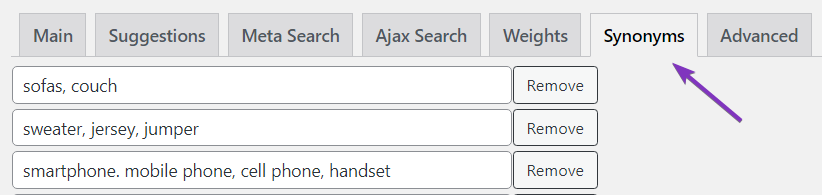
Use our global synonyms or our per-item mispellings to help your users find what they need, even if they mis-type. This is in addition to our automated search suggestions which pull the most likely searched for terms directly from items on your site when we run our table build.
Smart Variation Search
Super Speedy Search doesn’t only search products, but when it does, it does it well!
If you have product variations and you have different images for each variation, when a user searches for something – e.g. red nike sneakers – the red variation image will be shown in the search results rather than the parent product featured image. This makes your search results look gorgeous and gives your users the confidence to click through to your product pages and make a purchase.
Built and tested against Polish, Greek and English WordPress websites
Everything about Super Speedy Search is ready, to handle your language, no matter which language you are using or where you are from.
Polylang is the fastest of the multilingual plugins and compatibility with it is baked into our plugins. We personally recommend avoiding WPML because it is slow and not optimisable by our Scalability Pro plugin.
Compatible with everything you use
We have built Super Speedy Search in conjunction with our super users, and they have helped ensure we maintain compatibility with everything you use.
That includes all custom post types, all translation plugins, ACF, WooCommerce categories, attributes, postmeta – everything is searchable and everything is searchable fast!
Don’t take our word for it!
Here’s a video made by one of our customers
In the video, they talk about both Scalability Pro and Super Speedy Search
Common questions before you buy
You can read the full documentation in the Super Speedy Search knowledge base.
Super Speedy Search Knowledge Base
View full Knowledge Base →- Analytics & Caching: Track Searches and Cache Hot Results
- Faster wp-admin meta search
- Multi-search: Prioritise Recent Content for Faster Searches
- Searching multiple post types in full-page search results: Single ranked list vs Mixed sections
- Smart Variation Search
- Taxonomy combination suggestions
- Taxonomy Search
- Adjusting Super Speedy Search Weights
- Ajax Search Panel – Super Speedy Search Settings
- Getting Maximum Speed from Super Speedy Search
- How to add the Super Speedy Search widget into your header
- Installing and configuring Super Speedy Search
- Main Super Speedy Search Settings
- Meta Search – Super Speedy Search Settings
- Narrowing Super Speedy Search results with filters
What's new in Super Speedy Search?
View full changelog →- Fixed a fatal error that could take down wp-admin on sites still running an older build. The main plugin file used to load helper files out of the plugin's test folder, including one required on every REST API init. When the test folder was moved to a hidden .tests directory during a refactor, that path no longer resolved and PHP threw an uncaught "Failed opening required '…/tests/test-frontend-search.php'" fatal during admin REST preloads (seen via WooCommerce/Jetpack). The main plugin file now loads no test code at all – the .tests harness bootstraps itself – so this whole class of error cannot recur.
- Added meta key axis option to taxonomy suggestions so you can mix and match meta values and term names in the suggestions builder
- Updated the Super Speedy Settings page: added a "Recheck Licenses" button above the licence table so customers have a clear way to refresh licence status after a renewal or upgrade without scrolling down to the licence-key field. The button is disabled until a licence key is entered/saved and re-enables as you type.
- The Recheck flow now also force-bypasses the auth-server's own 1-hour licence cache (via a `force=1` flag on the `wpiapi/check_product_key` call), so renewals/upgrades that completed less than an hour before a recheck no longer show as expired/exceeded. Normal admin page loads continue to use both caches as before — only an explicit Recheck click bypasses them. (Lives in the `super-speedy-settings` submodule, so the change propagates to every Super Speedy plugin.)
- Fixed error with mysqli error (`mysqli_get_server_info(): Argument #1 ($mysql) must be of type mysqli, null given`) that could appear in the PHP error log during the WordPress `shutdown` hook, typically attributed to WooCommerce Action Scheduler. The suggestions/autocomplete handler `sss_get_json_Suggestions()` was calling `$wpdb->close()`, which closed the shared global database connection mid-request. WordPress does not reconnect within the same request, so the next code to use the database on shutdown — usually WooCommerce's BatchProcessingController calling Action Scheduler — crashed on the now-null connection handle. The redundant `$wpdb->close()` call has been removed; PHP closes the connection automatically at the end of the request anyway.
- Defensive clamps on LIMIT / OFFSET so SSS never emits negative paging in SQL. A production-log "LIMIT -100" pattern was traced to the rollup-variations search path (`woo_search_products_old`), where `(paged – 1) * posts_per_page` produced a negative offset for `paged=0` (absint normalises negative inputs to positive but lets zero through unchanged). The fix clamps `paged` to `max(1, …)` and `offset` to `max(0, …)` at the source, plus a belt-and-braces pass in `alter_query` that strips any negative integers from the outer-query LIMIT clause if anything upstream still slips through. The legacy `woo_search_products_old` LIMIT-only branch is also clamped now. Symptom in mysqld.log was "syntax error … near 'LIMIT -100'" with the user seeing zero results on the affected page; no functional regression on valid inputs.
- `?showweights=1` debug overlay now covers all post types and every weight, including the new taxonomy conditional match. Three fixes shipped together: (1) the new taxmatch weight from 5.53 wasn't being added to the score for single-post-type queries OR exposed as a debug column for either path — both fixed, so a single-PT search now scores taxmatch rules correctly and renders one `weight_taxmatch_<tax>_<slug>` column per rule, while multi-PT searches add a `weight_taxmatch_total` aggregate alongside the existing `weight_meta_match_total`/`weight_meta_value_total`/`weight_meta_date_total`. (2) The `RELEVANCE` total now appears in the debug output even when sorting by price/date/title etc. — previously it was only projected when `orderby=relevance` was the active sort, so admins comparing two products on a price-sorted page couldn't see what each one's relevance score *would have been*. (3) A new `wp_footer` HTML-comment fallback emits the per-post weight breakdown as `<!– SSS post 123 "Title" : RELEVANCE=… | weight_title=… | … –>` for every result row regardless of theme. Themes that override both the WC product loop template AND `the_content` (custom block themes, headless renderers) used to drop the debug entirely; the comments are always there for view-source, the visible inline rendering still happens where supported.
- Top Searches table on Analytics & Caching is now sortable and searchable. Click any of Search Term, Searches, Avg Speed or Last Searched to flip the order (default remains Searches DESC). The new filter input above the table queries against a FULLTEXT index on `search_term` — typing 3+ characters uses MATCH … AGAINST in BOOLEAN MODE with the same `+word*` prefix-wildcard pattern as the front-end search, so 'iph' finds 'iphone 13 case' instantly even on logs with millions of rows. Tokens of 1-2 characters automatically fall back to LIKE (prefix `LIKE 'xy%'` when the whole input is short, `LIKE '%xy%'` when combined with longer tokens that already narrow the set). The FT index is added automatically on existing installs the first time the Analytics tab loads after upgrade (one ALTER TABLE on a single-column varchar; runs in seconds even on busy logs). The active time-range filter (24h / 7d / 30d) still applies to the search results so what you type matches what's visible.
- Administrator is now a user-controllable row in Elevated Search Roles. Previously the administrator checkbox was hardcoded on (disabled, always checked) so admins always saw out-of-stock, hidden and private products in search results — fine for most sites, but a few admins wanted to browse the storefront and search results the way a regular shopper would (e.g. to verify what customers actually see). The row now defaults to checked so existing installs are unchanged, but it can be unticked to make admin searches use the same visibility rules as everyone else. Other roles still default to off and remain opt-in.
- Search-result cache key now includes `orderby`, `order`, a hash of the URL path (minus `/page/N/`), and hashes of the query's explicit `tax_query` and `meta_query`. Pre-5.53.7 the key was only `(searchstring, post_type, paged, lang)`, so a search warmed at /shop/?s=foo without orderby would silently return its relevance-ordered IDs (with `orderby` overridden to `post__in`) for every subsequent /shop/?s=foo&orderby=price, every /product-category/X/?s=foo (different archive), and every price-filter or stock-filter refinement. The path component is necessary because at `pre_get_posts` time WP hasn't yet built the `tax_query` array for URL-derived archives like /product-category/gaming/ (that happens later in WP_Query::parse_tax_query), so a tax-array-only hash wouldn't have distinguished /shop/ from /product-category/X/. Each variant now gets its own cache entry. Cache hit rate drops slightly in exchange for correctness; on busy sites the warm tier rebuilds quickly under load.
- Defensive sss_outer_orderby fallback in alter_clauses. When the user asks for `orderby=price` (meta_value_num) but the WP_Query meta_query JOIN didn't get built for whatever reason (an aggressive plugin stripped the orderby clause, another filter ran later, etc.), SSS now constructs the postmeta JOIN and ORDER BY explicitly so the outer query is never `ORDER BY LIMIT n` (which MySQL silently treats as no-ordering, losing the user's choice). Covers `meta_value_num`, `meta_value`, `date`/`publish_date`, and `title`; everything else falls back to a deterministic post_date DESC so the SQL is always valid.
- Taxonomy combination suggestions: the post type label is now a *claimable* position when the admin enabled "Show at Start" or "Show at End" on the combination row. Previously typing only the post type name (e.g. "forestry") matched the fulltext index but the post-fulltext claim algorithm dropped every row because no actual taxonomy term name was matched – so suggestions for that post type silently never appeared. Now, when the admin opted to surface the post type label in the rendered suggestion, that label counts as an extra claimable position; typing "forestry" returns rows in the Forestry post type, and typing "forestry trees" ranks the Forestry/Trees row above the Agriculture/Trees row because Forestry/Trees scored 2 of 2 versus Agriculture/Trees scoring 1 of 2. Rows where the admin chose "Don't Show" are unchanged (label not claimable, row not findable by typing the post type name) – keeps "what the user sees == what they can claim". No rebuild required; the change is in the claim algorithm at query time and the existing taxonomy-suggestions table already includes the post_type_label in its FULLTEXT-indexed combined column.
- The deferred-indexing hook surface is now aligned with Super Speedy Filters' SSF_Table_Maintenance pattern – same function naming (`sss_defer_post_update`, `sss_defer_term_update`, `sss_process_deferred_updates`), same shutdown priority (999), same DOING_AUTOSAVE and auto-draft skips, and the same wide hook coverage. SSS now hooks `wp_after_insert_post`, `save_post`, `wp_insert_post` (priority 99), `transition_post_status`, `set_object_terms`, the full WC product/variation/stock/duplicate set, bulk-edit and quick-edit AJAX, the WP importer hooks, and the explicit REST API insert/save/delete hooks for posts and terms – on top of the postmeta hooks (added_post_meta/updated_postmeta/deleted_post_meta) that SSF doesn't need but SSS does. All of them feed two deduped queues (posts + terms) drained once at shutdown, so a single product save that triggers 15 different action firings still runs one sss_update_posts batch. Same pattern as SSF, same function names where possible; a developer who learned one plugin's maintenance code immediately recognises the other's.
- Incremental indexing now picks up postmeta changes that happen after `wp_insert_post`. SSS used to hook only `wp_after_insert_post` (and a couple of WC variation hooks), which meant any importer or plugin using the pattern "create the post, then call `update_post_meta` for each field" produced an index row with empty `metavalues` – searches by SKU or other indexed meta_keys would miss those products until the next rebuild. SSS now also hooks `added_post_meta`/`updated_postmeta`/`deleted_post_meta`, gated to only the meta_keys SSS actually indexes (the Meta Keys tab plus every key referenced by metamatch/metavalue/metadate weight rules). All of SSS's per-post indexing hooks now feed a deduped queue that flushes once at PHP shutdown, so a request that fires `wp_after_insert_post` plus eight `update_post_meta` calls plus two `edited_term` calls runs a single `sss_update_posts` batch instead of eleven. Same hook surface fires from admin, REST API, Gutenberg, WP-CLI and cron – any code path that goes through WordPress core's `wp_insert_post`/`update_post_meta` benefits.
- New optional "Strict SKU search" mode on the Main tab. By default, SSS normalises punctuation in the fulltext index (so a search for `ABC.D.E` will match `ABC_D_EF` too — fast but loose, which is fine for most sites). Tick the new checkbox to layer an additional LIKE filter on the original, un-normalised meta values after the fulltext narrowing — searching for `ABC.D.E` will then return only products whose actual SKU contains the literal `ABC.D.E`, dropping the underscore-variant false positives. A new `metavalues_raw` column on wp_superspeedysearch holds the un-normalised meta string; populated from the next rebuild, then read with LIKE at query time on rows already narrowed by MATCH/AGAINST so the cost stays bounded. The filter only fires when the user's search term contains punctuation, so non-SKU searches are unaffected.
- Readiness Status now shows a warning when MySQL's `max_allowed_packet` is below 64MB. The default on many MariaDB installs is 16MB, which is fine for everyday queries but too small for the rebuild's bulk INSERT/UPDATE statements once a catalogue grows past a few thousand rows – the symptom on those sites is an intermittent "Error establishing a database connection" mid-rebuild that recovers a few seconds later. The new row prints the current value plus a link to the KB article explaining how to raise it; rebuilds keep working at any value, the warning just flags the rebuild risk.
- New "Taxonomy Conditional Match Weight" row on each per-type Weights block. Admin picks a taxonomy attached to the post type plus a term slug, and matches (or non-matches) of that term increase or decrease the relevancy score by a factor – same UX shape as the existing "Meta Conditional Match Weight". One new `term_taxonomy_ids` column on wp_superspeedysearch holds a comma-separated list of every term_taxonomy_id the post belongs to, populated via GROUP_CONCAT during rebuild; scoring uses FIND_IN_SET against that single column at query time, so there are no per-rule columns and no JOINs at search time. The one-time rebuild after upgrade adds the column – after that, adding, editing or deleting taxmatch rules takes effect on the next search with no rebuild required. The rebuild also bumps `group_concat_max_len` to 65535 so posts with many terms don't get truncated.









John Koenig (verified owner) –
Game changing plugin with fantastic and responsive support. Our operation is currently small in scope when compared to other sites powered by Super Speed Search, however, we now have the confidence that we can continue to grow our catalog without destroying Woo’s performance.
alan maclachlan (verified owner) –
Awesome support and a great product – I had trouble using the product and Dave went out of his way to help and to get it working for me. Highly recommended – great plugin for search. Thank you
inkoop (verified owner) –
This is really a game-changer for searching (products in my case) faster. It dropped a product search from 45 sec+ to 2-3 sec in combination with Scalability Pro. This is used on a website with 3000 products and as much variation. When you want to make your search faster, this is the plugin you need!
Daelmir –
Dave managed to achieve a full integration with my Woodmart e-commerce theme. On a store with thousands of products, product search is crucial, and speed is a precious asset. Previously, with Woodmart’s AJAX search, results took on average 2 to 3 seconds to load — now, thanks to Dave’s work, the search is instant. I highly recommend Speedy Search and thank David for what he has done!
piltchev (verified owner) –
That is the best search plugin on the market and I can guarantee that – I have tried pretty much everything. I have a website with over 500k posts and I got to the point that I was thinking of removing my search bar. SSS is the way to go! Ordering and giving weights to search is easy, AJAX speeds are incredible. Thank you for making this plugin!
Michel Nijman (verified owner) –
After using 2 other plugins from Super Speedy Plugins, our choice for a new search plugin easily fell to Super Speedy Search: fast and immediate support and of course amazing speed!
I also use Scalability Pro and Infinite Scroll, so when our previous search plugin provider raised prices 50-fold, we needed a new search plugin. Knowing that this existed, it was a quick and painless switch to Super Speedy Search as it would also improve back-end search, something we were struggling with as with about 35.000 products it wasn’t always as fast as we wanted it
Mark Francis –
This is precisely the search plugin you need for your WooCommerce website. It performs well with our 50,000+ product catalogue.
Support from Dave and his team has been excellent and any issues are resolved quickly.
Thats 5 stars from me!
Justin Murray –
Incredible woocommerce search plugin, performs great, support is fast if needed, and integrates well into my theme.
David Graham (verified owner) –
I have been using Super Speedy Filters few years now and would recommend it to anyone running a large WooCommerce store. The filters are rapid compared to default WordPress ones and support is second to none. 10/10
David Graham (verified owner) –
I have been using Scalability Pro (also made by WP Intense) for a good few years now with no complaints and recently added Super Speedy Search and their Super Speedy Filters to our site.
Super Speedy Search is working great on our site which has a hundred or so products, but the products have quite a lot of variations on them. Previously loading the full search results page was getting quite slow. Now with Super Speedy Search, when the customer hits enter or clicks to see all of the products from their search results it displays that page much quicker than any other plugin we have used previously. I’m very pleased with this, it is like some sort of performance wizardry!
Customer service is great too and being able to get help from the discord server is very quick and convenient.
marinblu0000 (verified owner) –
Amazing plugin to create comprehensive and the fastest search for WP.
It looks great and does exactly what the information says it will!
After testing many pro search plugin, we found that SuperSpeedSearch was the only that could handle the amount of our products (300k+)!
The support we received was fantastic–very timely and helpful! Any question & problem we’ve had has been answered & resolved.
We were looking for a very advanced plugin and this plugin has helped us do just about everything we were looking for and more.
Keep going wpintense team!!!
Shawn Tjai (verified owner) –
Our current WP websites have been really laggy and despite switching to more powerful servers, we kept encountering bottlenecks until we found WPI.
We are currently using Super Speedy Search + Scalability Pro and it has been phenomenal with the performance improvements!
Across 2 of our websites on 1 server, we are looking at 90k MAU with 6k products total.
Dave has also been a great help with any bugs during the setup process – really speedy response and he sure knows what he is doing!