External Images
Store your images anywhere - a CDN, Amazon S3, a Digital Ocean space or your affiliate feed - and serve them straight through WordPress. Nothing gets downloaded to your server, so imports run faster and your disk stops filling up. Works with any post type and every WooCommerce product type, including variations and galleries.
Rated 4.65 out of 5 across 26 reviews.
- Import products without WordPress downloading or resizing a single image
- Scale to millions of products on low-cost hosting, with no image storage to worry about
- Works with WP All Import, Datafeedr and any tool that can set a custom field
- Cut disk usage and the CPU normally spent generating 20+ thumbnail sizes per image

Precision-Engineered Images
Serve product and post images from anywhere — no downloads, no bloated media library.
Architected for Speed
// Rewrite external image URLs through your CDN
add_filter( 'ssei_image_url', function( $url ) {
  return str_replace( 'origin.example.com', 'cdn.example.com', $url );
} );
“I’m impressed. I host images for SEO and don’t want WordPress downloading copies. With this plugin I upload references to my own images — and support is fantastic; Dave personally resolved a theme issue for me.”
“Excellent, and does exactly what it says. Our images already live on their own servers, so it makes sense to use them from there — now I don’t worry about hosting file limits and can just add more products.”
Invest in Speed
One licence, unlimited speed. Backed by our 60-day money-back guarantee.
5 Sites
- 5 Site Licenses
- All post types & galleries
- Any CDN or storage
- Priority support
Unlimited
- Unlimited Sites
- All post types & galleries
- Any CDN or storage
- Priority support
Image storage is the number one thing that slows down product imports and caps how big an affiliate or product store can grow. External Images keeps every image on your CDN, feed or storage and serves it straight through WordPress, so nothing is ever downloaded to your server.
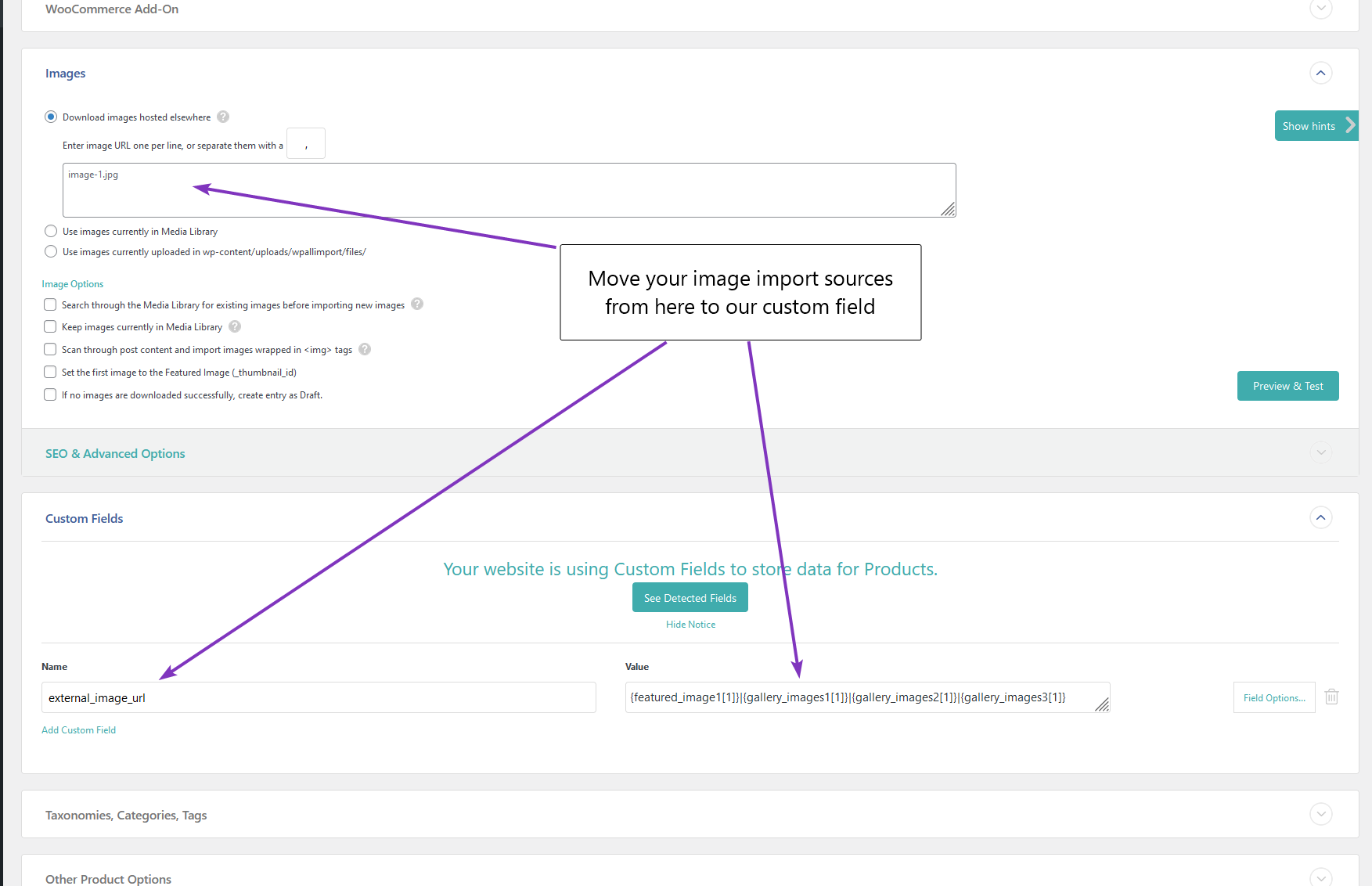
Install, activate, and point your import at the external_image_url custom field (separate multiple images with the | symbol). Turn off image uploading in your import and you are done. External Images handles the rest.
What External Images gives you back
- Faster imports. WordPress normally downloads every image and generates 20 or more sizes per product. Skip all of that and imports run far quicker.
- Your disk back. Images live on your CDN or feed, not your server, so storage stops being the thing that caps your catalogue.
- Real scale. Build affiliate or product stores with millions of items on low-cost hosting, because there is no image storage to grow.
- Lower CPU and hosting cost. No thumbnail generation hammering your server on every import.
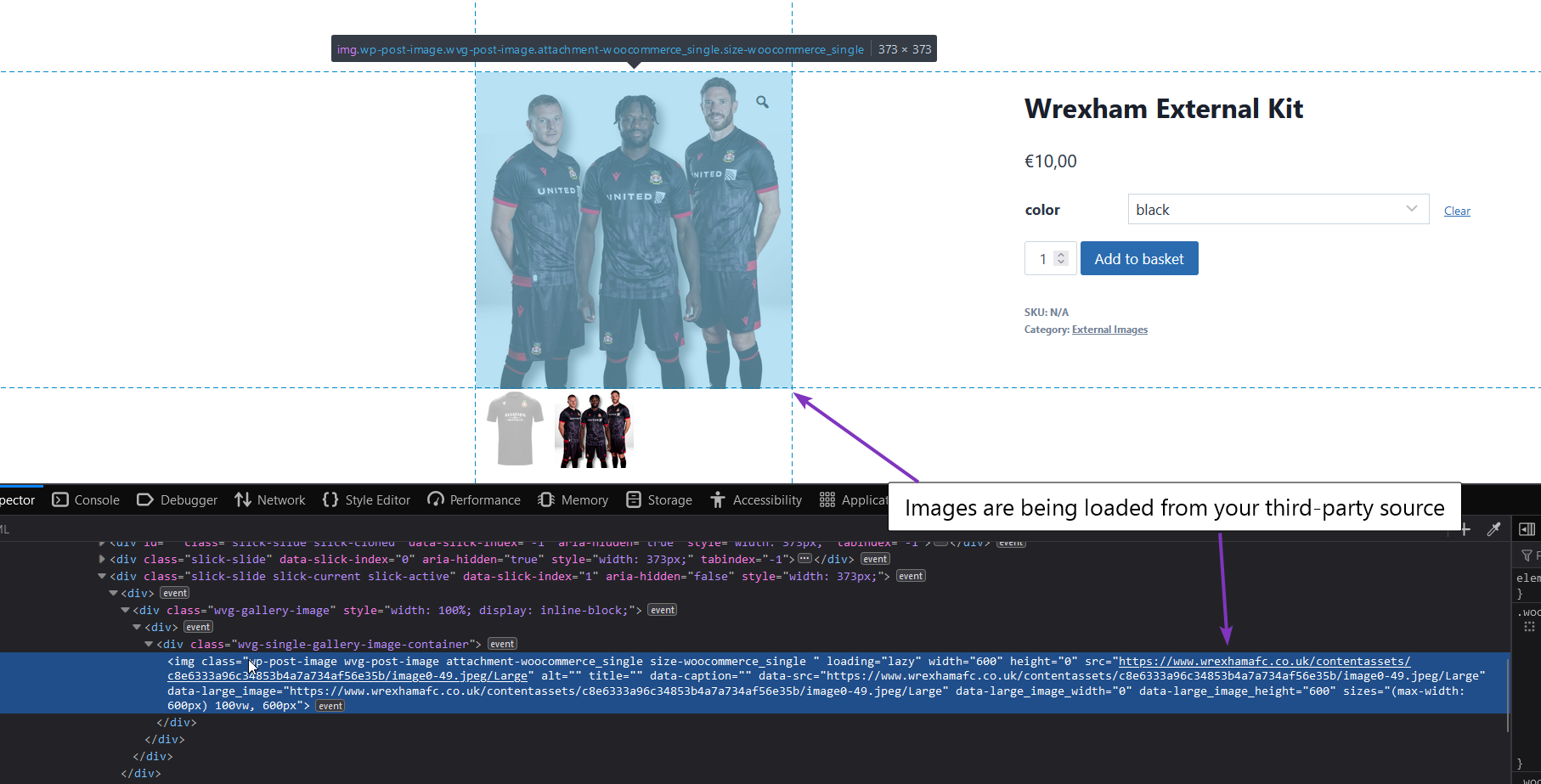
- Still looks right. CSS or Photon resizing keeps external images fitting your theme, and Open Graph tags still feed the right image to Facebook, Twitter and Google (Yoast and RankMath compatible).
Key features
- External image URLs on archive pages, posts, products and any post type.
- No image downloads, so disk and CPU are saved and imports run far faster.
- Datafeedr support stops image downloads and fixes Product Comparison Sets.
- Works with WP All Import and any tool that can set a custom meta field.
- Gallery support by adding pipe-separated URLs to the external_image_url field.
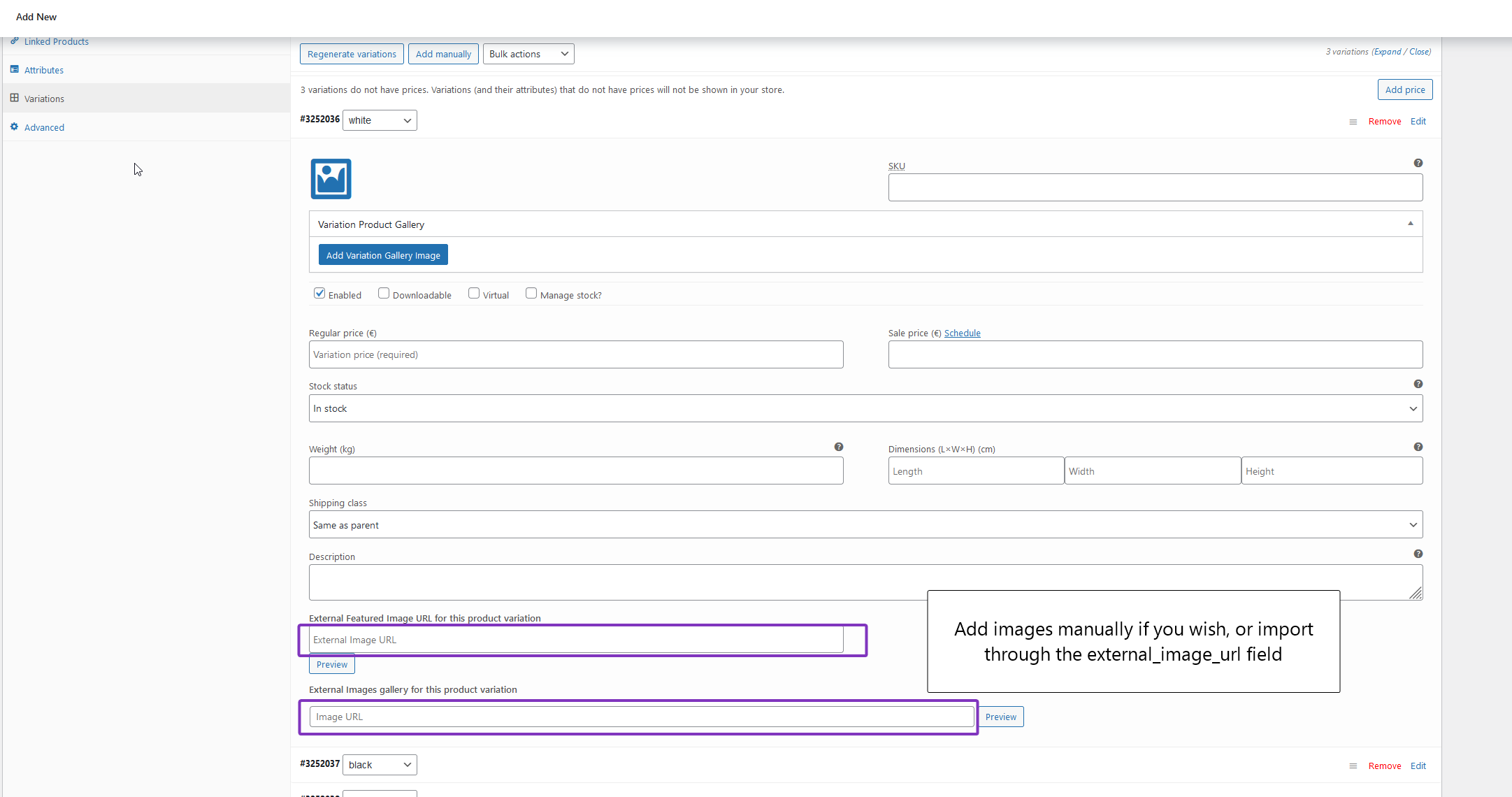
- Variation images and variation galleries with Kadence or a free variation gallery plugin.
- Automatic HTTPS proxy for insecure images, with an optional proxy-all option.
- Open Graph tags for Facebook, Twitter and Google, compatible with Yoast and RankMath.
- CSS or Photon resizing so off-site images still fit your theme.
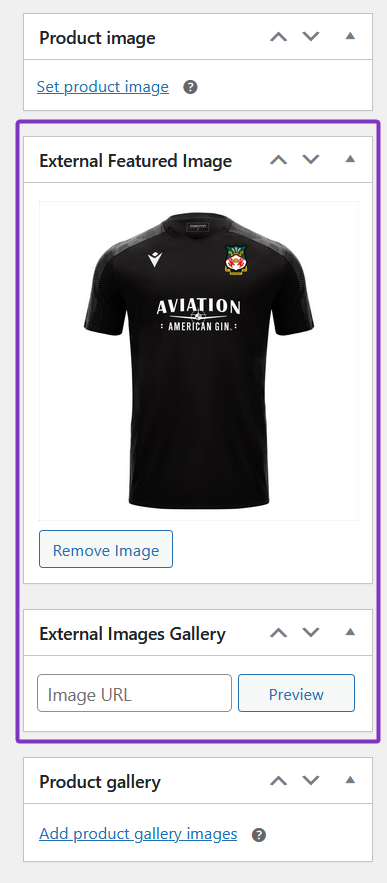
- Manual URL field under the featured image, so no import tool is required.
Why choose External Images
External Images Knowledge Base
View full Knowledge Base →What's new in External Images?
View full changelog →- Added new postmeta filter to add front-end gallery compatibility to latest Houzez theme – they no longer use metabox for their metadata
- Updated the Super Speedy Settings page: added a "Recheck Licenses" button above the licence table so customers have a clear way to refresh licence status after a renewal or upgrade without scrolling down to the licence-key field. The button is disabled until a licence key is entered/saved and re-enables as you type.
- The Recheck flow now also force-bypasses the auth-server's own 1-hour licence cache (via a `force=1` flag on the `wpiapi/check_product_key` call), so renewals/upgrades that completed less than an hour before a recheck no longer show as expired/exceeded. Normal admin page loads continue to use both caches as before — only an explicit Recheck click bypasses them. (Lives in the `super-speedy-settings` submodule, so the change propagates to every Super Speedy plugin.)
- Added full namespacing for plugin update checker to prevent conflicts with 3rd party plugins
- Removed code for checking for and deleting orphans – this can be handled through a KB article instead as it's a one-off job to clean up data
- Further improvements for image galleries, variation galleries and all ways of saving, updating or importing images to prevent duplicate entries in database
Works well with
Add any 2 or more Super Speedy plugins and every extra one is 35% off — automatically at checkout.


26 reviews for External Images
Invest in Speed
One licence, unlimited speed. Backed by our 60-day money-back guarantee.
5 Sites
- 5 Site Licenses
- All post types & galleries
- Any CDN or storage
- Priority support
Unlimited
- Unlimited Sites
- All post types & galleries
- Any CDN or storage
- Priority support

Sebastian B. (verified owner) –
Great plugin haven been using this in combination with a Jet Engine CPT and creating new posts with the cpt API end-point. no hassle solution to get your cpt to use external images for featured image and gallery simmply post like this in you API post body
“external_image_url”: “https://image1.jpg|https://image2.jpg|https://image3.jpg”
Zlati Z. –
I had to import 500k posts in my website. As you can imagine that process takes time. I did some research and I found out that if I want to import posts with images that would have probably taken me 10 years to do so. After that I saw this plugin mentioned in a forum and gave it a try – my import was completed in less than 1-2 hours. Amazing plugin that solves a really bad problem! Thank you!
Adam N. (verified owner) –
We recently implemented the use of external images across several hundred websites on our network and it has really helped our overall process from load times, disc space usage, etc. I have used almost all of superspeedys plugins and this one is amazing, just like all the others.
Glyn S. (verified owner) –
That’s great news. Thank you!
Thomas P. –
Great plugin that saves a huge amount of diskspace on your server. And the support is great and impressively fast 🙂
Thank you very much 🙂
Jimmi N. (verified owner) –
The product runs smoothly, although I had to tweak it slightly to accommodate my specific requirement of appending query parameters to images. The code is both well-structured and easy to navigate.
That said, there seems to be a shortfall in the customer support department. I’ve posted a question in the FAQ that has yet to be addressed, and I’ve observed that I’m not the only one facing such communication challenges.
Previously, when I purchased another one of your plugins, I reported a bug but received no response.
I see a lot of promise in what you’re offering and understand that juggling all aspects of a business is no small feat. This is why I suggest hiring a dedicated customer support specialist to solely focus on addressing customer concerns. I believe this would be a valuable addition to your business. However, the decision is ultimately yours.
Best regards
Jimmi Nielsen
Dasar G. (verified owner) –
External Images allowed me to import products at 6x the speed! Great plugin as are Dave’s other plugins, and fantastic support. He will make updates to the plugin within days to fix any issues you may run into. 5/5, highly recommend.
Mark (verified owner) –
I’m impressed. I wasn’t sure I would be able to accomplish what I needed with my images. I’m hosting images on my site for SEO purposes. On product upload, I don’t need WP to download those images and create multiple versions that a browser could serve (more images served = slower website load). Since I’ve optimized my images I want WordPress to use those images. With the external images plugin, I’m able to upload my images via FTP. Then I upload a reference to those images in the product upload file. Also, support is fantastic. My theme had a slight issue with external images. Dave personally looked into it and was able to quickly resolve the issue for me.
MARCUS F. (verified owner) –
Purchased the external images plugin which was superb. Needed some bespoke work so it was compatible with a third party plugin and Dave was only to happy to help and in record time. Very happy.
Dave H. –
Thank you, glad to be able to help and very happy that everyone is happy with our Discord server for support 🙂
Gary C (verified owner) –
I have been looking a very long time for a plugin that does what this plugin does! Amazing support and answers to my questions. Thank you!
Joseph Miller (verified owner) –
F&cK*&^ Amazing Plugin no joke. Not stressed about cropping and compressing anything. Thanks guys.
Joseph Miller (verified owner) –
No joke I initially got this plugin so I could experiment with scaling Woocomerce. Fell in love with it. I have roughly 2100 products In my current project. I have the archive set to 16 products per page. On any given archive page total sizes less then 400 kb. It’s wild you would never be able to tell the images were not your own. Instantly load. Hats off to the team. Seriously doubt I will ever start another project with out incorporating it.
Daniel A. (verified owner) –
My site breathed after using this plugin with the server, because it allows you to import products through product import plugins without downloading photos / images to the server. And it also gives the possibility to add a thumbnail to the product or the entire gallery through links to external images, and thus, if we have, for example, several pages, we can use one image on many pages. Without this plugin, we would have to add the same image on each of our wordpress pages. Useful plug.
Fabio (verified owner) –
For big blog it’s a must have in order to increase speed page and reduce hosting disk space
Kerstin K. (verified owner) –
I wait now over 1 Month for support. Nothing works, no support.
Please give me a refund.
Dave H. –
Sorry for your poor experience, August had me pulled in all directions.
Stuart J. (verified owner) –
Thanks, this plugin is excellent and does exactly what it says!
Our webhosting provider is one of those that offers ‘unlimited’ storage space, but in very tiny print states that there is a ‘technical’ limit on the number of files you can have in your account.
We use multi-channel listing software, and all our images are already uploaded to their own image servers, so it makes sense to use the images from there rather than have them uploaded to our website hosting as well.
Now with this plugin, I don’t need to worry about finding a new hosting provider or file storage limits, and concentrate instead on adding even more products to our Woo Shop.
Dave H. –
Thank you for your review and I’m glad to hear about another area where this plugin is popular. I hope you find the recent updates useful too – we added variation images and variation galleries as well as image preview in the admin area and better compatibility with theme magnifying glasses etc.
nokivcon –
Hi,
For Woocommerce to have multiple image links, so that multiple images can be shown, will the plugin accommodate?
Also do you have any suggestions for any services that allow to upload product images along with a metadata like the SKU, which we can export to a csv/spreadsheet time to time to get the matching image URLs for a product SKU?
Dave H. –
The current live version allows featured images and gallery images.
The current beta version has above (improved editor) as well as variation images.
I’m working on adding variation gallery images too into beta.
re: SKU, WooCommerce has a field you can set for SKU. A good import tool is WP All Import.
kasa k. –
I love how fucking fast External Images when I import a lot image without need the CDN server.
Dave H. –
Thanks! That’s the primary reason I built it. That and the ability to have millions of products in your affiliate store without the need for massive amounts of storage space.
Markus P. (verified owner) –
Bought external images and scalability pro. 5 stars for both of them. Thank you for these superb plugins which really boosted my website speed and product imports.
savvas z. (verified owner) –
I was looking to make my wordpress site faster. I ended buying/using scalability pro. Excellent product, amazing performance for my site. After importing thousands of products my server lagged due to the enormous amount of images that i imported. External images to the rescue!!!! With the external images i keep my server clean and my site super fast!!! No more unnecessary thumbnails.
By the way support from Dave is first class!! Top notch developer!! Top notch support!
Highly recommended plugin!!! AAA
Thanks Dave for the awesome plugins and support!!!!
Ida Nielsen –
Some time ago I bought this plugin and it always worked smoothly. Recently there were some WordPress updates and my website broke (probably because of the Gutenberg editor addition).
I contacted the support/developer (Dave) and in few days my problem was completely solved! The plugin is now even better than before and I’m sure it will keep improving.
To sum up, I definitely recommend this External Images plugin, by far the best in the market!
Dave H. –
Hi – thank you for your kind comments, and thank you for your help improving the plugin 🙂
Digital D. (verified owner) –
Unfortunately this plugin doesn’t work on my websites. I have asked for the refund and I’m waiting, but nobody is answering.
Dave H. –
Hi – sorry for the delay – there’s an upgrade out today which should fix any issues you are experiencing.
I’m now working on documentation for External Images for the rare themes that do not use the correct functions to grab thumbnails etc – even with these themes, External Images will work but with those it will take a little modification to your child theme.
Berkay K. (verified owner) –
Since HTTPS became standart I was having trouble compiling with https rules on my woocommerce site, since my images are hosted on a non-https server. With External images my non-https images become https via proxy on my server.
Altough it did not work immediately as I install it due to a problem on my word press theme, great support from Dave and his team kicked in and solved the problem on the theme.
Great Plugin, Great Team, Great Support…
Many thanks!
ming ming s. (verified owner) –
I’ve been looking for this kind of plugin to speed up my web for months . I have to admit It bothered me for a long time. And it’s so wired I didn’t find any one (no matter a free or paid one) until I watched the video of this plugin “external images” on youtube. At first, I thought this might be a plugin like others just supporting embedding pictures, not storing on remote vps. After watched the video, I knew this is the one I’ve been looking for. Now I can store all the pictures (thousands) on amazon s3 for my website, and don’t need to worry about the loading speed of my website. This is the best plugin ever!
Erik D. (verified owner) –
I both save space and got better speed on my site.
My friend is on shared host and for him it did a big difference.
Works out of the box and no hassel with setup.
This plugin it great.
Luigi N. (verified owner) –
Super plugin with an impressive support. Thank you!
Lali O. (verified owner) –
Thank you for this plugin, it is really very necessary plugin! No images on my hosting! I am really happy! I have store with more than 1 000 000 goods, and I do not need Big space disk for images.