Multi-search: Prioritise Recent Content for Faster Searches
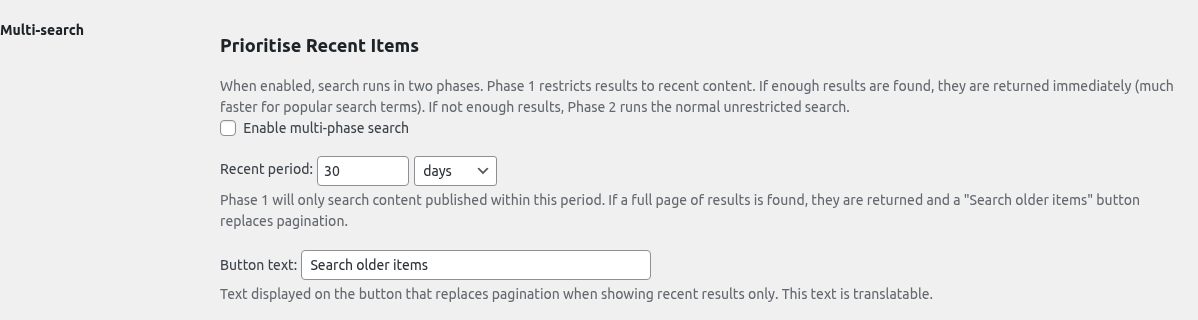
The Multi-search tab configures a two-phase search strategy that restricts Phase 1 to recent content only, falling back to an unrestricted search if not enough results are found. This is a big win on sites with large archives (news, blogs, forums) where most users searching for a term are after recent coverage — serving Phase 1 results is significantly faster than scanning years of old posts.
Table of Contents
How it works
With multi-phase search enabled, every search runs in up to two phases:
- Phase 1 (recent only): Super Speedy Search restricts the query to content published within the configured recent period (e.g. last 30 days). If a full page of results is found, those are returned and a “Search older items” button replaces the normal pagination.
- Phase 2 (fallback): If Phase 1 returns fewer than a full page of results, the query is re-run without the date restriction and Phase 2 results are returned instead. The user never sees that two queries ran.
The AJAX dropdown search uses the same two-phase logic, so the instant-results panel also benefits.
Settings
Enable multi-phase search
The master toggle. When off, all searches behave normally (no date restriction, standard pagination).
Recent period
How far back Phase 1 looks. Defaults to 30 days. Available units:
- days
- weeks
- months
Choose a period that matches your typical content freshness. For a daily news site, 7–30 days is usually right. For a blog that publishes weekly, 3–6 months is more appropriate.
The label on the button that replaces pagination when Phase 1 returned a full page of results. Defaults to “Search older items”. This text is translatable — edit it here if you want to match your site’s tone (e.g. “See older articles”, “Show archive results”).
When to enable multi-phase search
Enable it if any of the following are true:
- You have a large
wp_poststable (tens of thousands of posts or more). - Most users search for current topics and rarely need archive results.
- Your search performance on popular terms is slower than you’d like.
Skip it if:
- Your archive is small — the overhead of running two queries on misses outweighs any Phase 1 win.
- Users typically search for historical content (e.g. a research archive where old posts are equally relevant).
Interaction with caching
Multi-phase search works with the Analytics & Caching tab’s caching rules. When a cached result exists for a given term, it is returned immediately — Phase 1 / Phase 2 logic only applies to cache misses. This means once a popular recent-only term is cached, it stays fast regardless of which phase originally produced it.
When Phase 1 returns a full page of recent results, the normal pagination is replaced with a single button. Clicking it appends ?sss_show_older=1 to the URL, which tells Super Speedy Search to skip the date restriction and show the full unrestricted result set (excluding the items already shown in Phase 1).
This is handled via a small script injected into wp_footer, so it works across all themes without requiring template changes. If your theme doesn’t expose a standard .pagination / .nav-links / nav.navigation / .woocommerce-pagination element, the button is appended inside the main content area (main, .site-main, .content-area, etc.) as a fallback.
Tips
- Start with the default 30 days. If you see too many “Search older items” clicks in the Analytics & Caching tab, widen the period. If you rarely see the button appear, narrow it.
- Combine with slow-search auto-cache. Terms that still take a while even in Phase 1 will be auto-cached on their second hit if you enable slow-search caching on the Analytics & Caching tab.
- Cache is per-phase transparent. The cache key includes the search term, post type, page number and language — not the phase — so cached results survive a toggle of this setting.
